
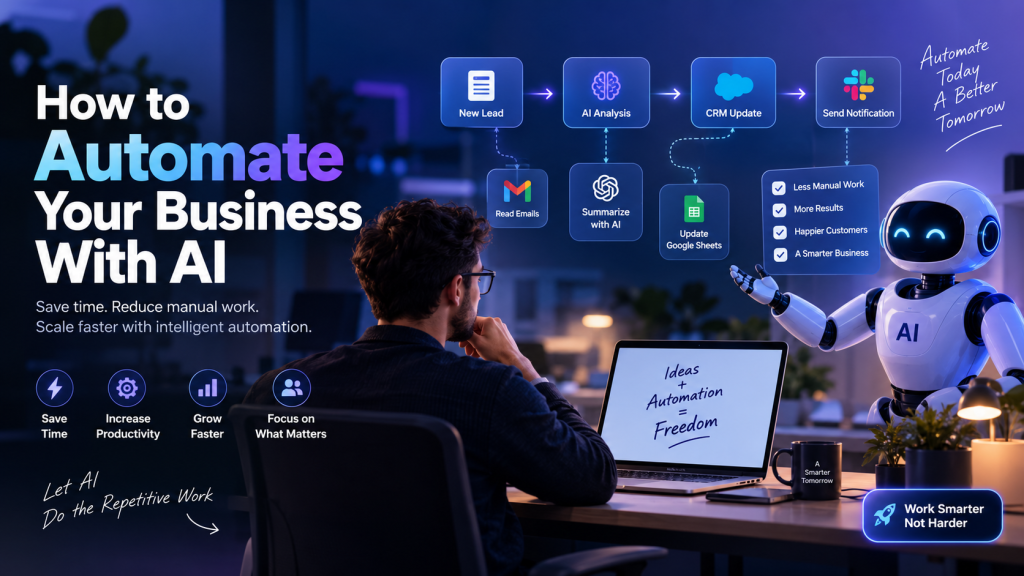
Businesses don’t usually lose time because of one huge problem.
They lose it through hundreds of small repetitive tasks.
This is where AI automation can make a real difference.
Instead of using AI only as a chatbot or writing assistant, businesses can connect AI with their existing tools and create workflows that automatically collect information, reason about it, and take action.
AI automation helps businesses reduce repetitive work, streamline business processes, save time, and improve productivity. From qualifying leads and managing emails to generating reports and supporting customers, AI-powered workflows can handle many time-consuming tasks automatically.
Businesses don’t usually lose time because of one huge problem. They lose it through hundreds of small repetitive tasks that happen every day.
Checking emails. Copying data. Qualifying leads. Writing routine replies. Creating reports. Following up with customers.
With the right AI automation workflow, these repetitive processes can be connected into intelligent systems that collect information, use AI to reason about it, and take the next action automatically.
A simple framework is:
Trigger → AI Reasoning → Action
The goal isn’t to automate everything. The goal is to automate the right work so your team can focus on strategy, creativity, customers, and business growth.
What Is AI Automation?
Checking emails.
Copying data into spreadsheets.
Qualifying leads.
Writing routine replies.
Creating reports.
Following up with customers.
AI automation is the use of artificial intelligence and automated workflows to handle repetitive, data-heavy, or decision-based business tasks.
A simple AI automation workflow can be understood through three stages:
Trigger → AI Reasoning → Action
For example:
New website lead → AI qualifies the lead → CRM is updated and sales team is notified.
The goal isn’t to automate everything.
The goal is to automate the right work so people can spend more time on tasks that require creativity, strategy, and human judgment.
Why Businesses Are Using AI Automation
Traditional automation works well when the rules are predictable.
But modern business processes often contain emails, documents, customer messages, unstructured information, and decisions that require context.
That’s where AI adds another layer.
An AI-powered workflow can interpret information, categorize it, summarize it, generate content, or make a decision before passing the result to the next step.
This makes AI workflow automation useful for many areas of a business.
5 Business Tasks You Can Automate With AI
1. Lead Qualification
A new lead submits a form.
The workflow can:
- Collect the lead information
- Analyze the lead with AI
- Determine the lead’s potential
- Add the lead to a CRM
- Notify the sales team
- Send an appropriate follow-up
Instead of manually checking every lead, your team receives prioritized opportunities.
2. Customer Support
AI automation can help process incoming customer messages.
A workflow can identify the customer’s issue, categorize the request, search for relevant information, draft a response, and route complex cases to a human.
For sensitive customer communication, a human approval step can remain in the workflow.
3. Email Management
Imagine receiving hundreds of emails every week.
An AI workflow can classify incoming emails into categories such as:
- Sales
- Support
- Billing
- Partnership
- General inquiry
The system can then route, summarize, or draft responses based on the category.
4. Reporting and Data Processing
Businesses often spend hours collecting information from different sources and turning it into reports.
AI automation can collect the data, summarize important changes, identify patterns, and send the report to the appropriate team.
5. Content and SEO Workflows
AI agents can also support SEO and content operations.
A workflow can move through stages such as:
Keyword research → Content brief → Draft → SEO optimization → Human review → Publishing → Monitoring
Modern AI SEO workflows increasingly use agents to connect multiple steps rather than simply generating an article from one prompt.
How an AI Automation Workflow Works
A practical workflow can follow the Get → Prompt → Transfer model.
Get — Trigger
Something starts the workflow.
Examples:
- New email
- Website form submission
- New customer
- Scheduled task
- New spreadsheet row
- Incoming support request
Prompt — AI Reasoning
The AI receives the information and performs a task.
It might:
- Classify information
- Summarize text
- Extract data
- Generate a response
- Analyze a lead
- Make a recommendation
Transfer — Action
The result is sent somewhere.
For example:
- Update a CRM
- Send an email
- Update Google Sheets
- Create a task
- Send a Slack notification
- Generate a report
This simple framework makes complicated AI workflows easier to design.
Which AI Automation Tools Can You Use?
Several workflow automation platforms can act as the foundation for AI-powered systems.
Popular options include:
- n8n
- Make
- Zapier
The best platform depends on the workflow, integrations, technical requirements, cost, and level of control you need.
For more advanced systems, AI agents can connect tools and execute multi-step processes instead of simply performing one isolated action. Current SEO research, for example, shows agents being used for keyword research, content briefs, technical audits, traffic-loss analysis, and publishing workflows.
How to Start With AI Automation
Don’t start by asking:
“What AI tool should I use?”
Start with:
“What repetitive process is costing my business the most time?”
Then follow these steps.
Step 1: Identify Repetitive Work
Look for tasks that happen frequently and follow a recognizable process.
Examples:
- Copy-paste work
- Data entry
- Email sorting
- Lead qualification
- Reporting
- Customer follow-ups
Step 2: Map the Current Process
Write down:
Input → Process → Decision → Output
This helps you understand what should actually be automated.
Step 3: Choose the Right Tools
Choose an automation platform and connect the tools your business already uses.
For example:
Website → n8n → AI model → CRM → Email
Step 4: Add AI Where Reasoning Is Required
Don’t use AI for every step.
Use traditional automation for predictable operations and AI where interpretation, classification, generation, or decision-making is required.
Step 5: Test Before Going Live
Run the workflow in a controlled environment first.
Check:
- Accuracy
- Failure cases
- Data handling
- API errors
- Unexpected AI responses
Step 6: Keep Humans in the Loop
Automation doesn’t mean removing humans from every process.
For sensitive actions—such as external customer emails, financial decisions, or important business communications—a human approval step can make the system safer and more reliable.
AI Automation vs Traditional Automation
Traditional automation generally follows predefined rules.
For example:
If a form is submitted, add the data to a spreadsheet.
AI automation can handle more flexible inputs.
For example:
New customer message → understand the request → classify the issue → determine the appropriate response → send for approval → update CRM.
The difference is the ability to work with unstructured information and context.
What Should You Automate First?
A good first automation usually has three characteristics:
High frequency + repetitive process + measurable outcome
For example:
If your sales team manually qualifies 100 leads every week, that may be a strong automation candidate.
If a task happens once a year and requires complex human judgment, automation may not be the right priority.
Final Thoughts
AI automation is not about replacing every person or adding AI to every process.
It’s about building better systems.
The most valuable automation opportunities are usually hidden inside repetitive business processes that people have accepted as “just part of the job.”
Find those processes.
Map them.
Automate the predictable parts.
Use AI where reasoning is required.
Keep humans involved where judgment matters.
Then measure the result.
The future of AI automation isn’t simply using AI. It’s building workflows where AI can actually get work done.
If your business has repetitive tasks that consume hours every week, that may be the first place to look for an AI automation opportunity.
Frequently Asked Questions About AI Automation
What is AI automation?
AI automation combines artificial intelligence with automated workflows to perform repetitive, data-heavy, and decision-based business tasks.
How does AI automation work?
Most AI automation workflows follow a simple process: a trigger starts the workflow, AI analyzes or processes the information, and an action is performed based on the result.
What business tasks can AI automate?
AI can help automate tasks such as lead qualification, email classification, customer support, reporting, data processing, content workflows, and repetitive administrative work.
What tools can be used for AI automation?
Popular AI automation platforms include n8n, Make, and Zapier. The right tool depends on the workflow, integrations, technical requirements, and desired level of control.
Should every business process be automated?
No. The best candidates are usually repetitive, high-frequency processes with measurable outcomes. Tasks requiring complex human judgment may still need human involvement.