
How I Built an AI-Powered Appointment Scheduling System with n8n
A practical case study showing how AI, workflow automation, forms, databases, Google Calendar and email can work together to automate the customer appointment journey.
🚀 Introduction
Appointment scheduling can become surprisingly complicated when a business receives a large number of customer enquiries.
A typical process requires someone to collect customer information, review the enquiry, check availability, communicate with the customer, create the appointment, and send confirmation.
🎯 The Problem
Traditional appointment systems often depend heavily on manual work.
- Customer enquiries need to be reviewed manually.
- Staff spend time answering repetitive questions.
- Appointment availability must be checked manually.
- Customer information can become scattered across tools.
- Confirmation emails have to be sent manually.
- Growing enquiry volume creates additional administrative work.
I wanted to build a system where automation handles the repetitive steps while humans remain involved when important decisions are required.
🏗️ The Automation Workflow
The following workflow demonstrates how different automation components can work together to create an AI-powered customer journey.
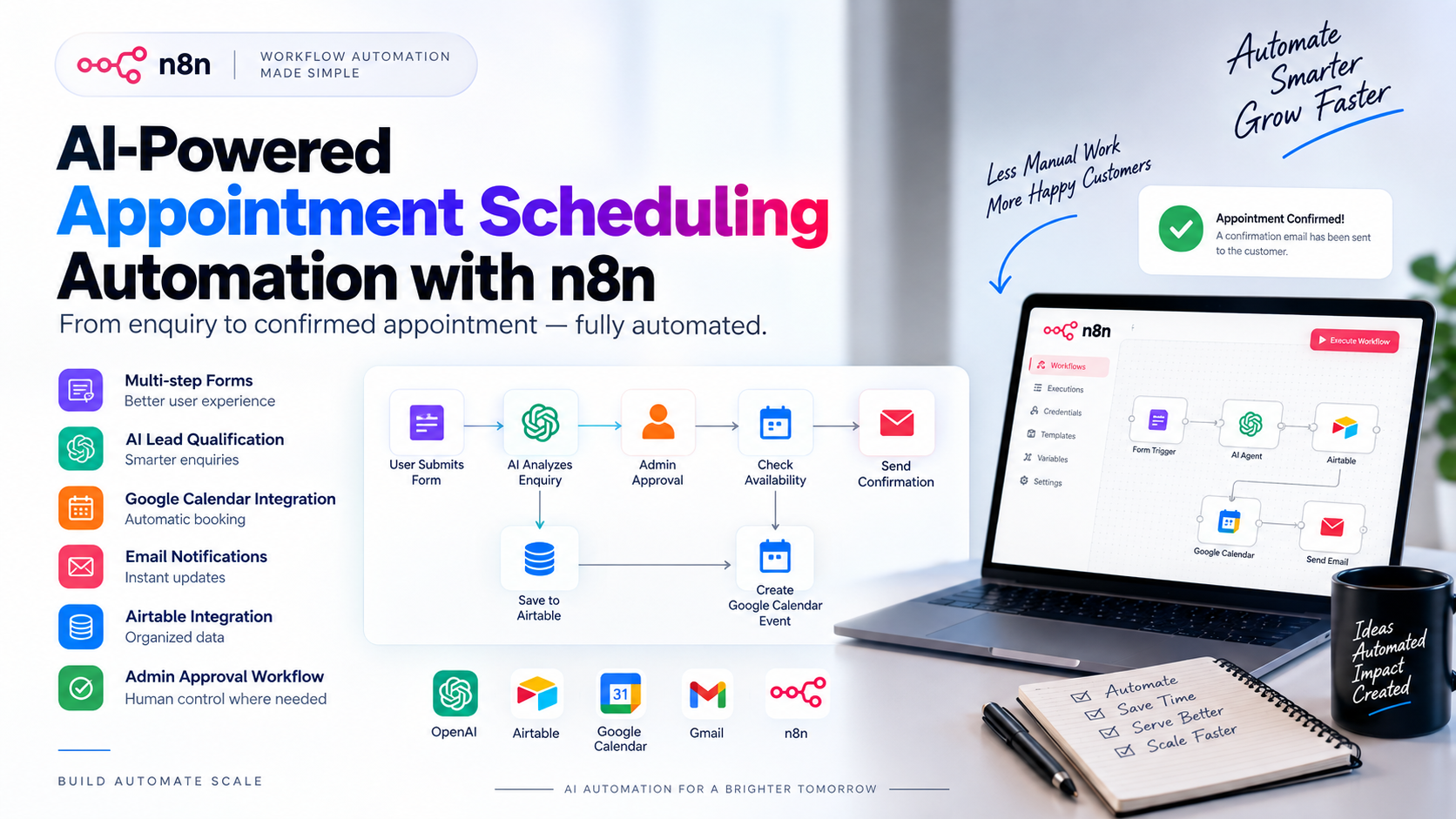
⚙️ How the AI Appointment Automation Works
The complete process can be simplified into several automated stages.
Customer
Form
AI
Analysis
Admin
Approval
Calendar
Booking
Confirmation
🧩 Main Components
Multi-Step Forms
Collect customer information progressively instead of overwhelming users with one large form.
AI Enquiry Qualification
AI analyzes incoming enquiries and helps determine whether a request matches predefined criteria.
Human Approval
Important decisions can still be reviewed and approved by a human before the automation continues.
Google Calendar
Approved appointments can be automatically added to Google Calendar.
Data Management
Customer and appointment information can be organized using database and spreadsheet integrations.
Email Automation
Automated emails keep customers and administrators updated throughout the process.
🔧 Technology Stack
I used several tools to connect the complete automation workflow.
🧠 How AI Improves the Workflow
The important part isn't simply adding AI to an automation. The AI needs to have a clear role inside the overall system.
This creates a hybrid system where AI handles repetitive analysis while humans maintain control over important decisions.
⚠️ Challenges I Faced
1. Data Validation
User-submitted information needs to be checked before moving into the next stage of the workflow.
2. AI Decision Logic
AI outputs need clear instructions, criteria and fallback logic to make the workflow reliable.
3. Human Approval
Fully autonomous decision-making isn't always appropriate. A human approval layer provides additional control.
4. Calendar Availability
Appointment automation must carefully handle availability and scheduling conflicts.
5. Error Handling
A production-ready workflow needs fallback paths for unexpected inputs and failed integrations.
🏗️ Automation Architecture
At a high level, the architecture follows this pattern:
This modular architecture makes it easier to maintain, troubleshoot and expand the automation later.
📈 Business Value
A system like this can help service-based businesses reduce repetitive administrative work and improve their customer experience.
💼 Real-World Business Use Cases
Healthcare & Clinics
Automate appointment enquiries and scheduling workflows.
Real Estate
Qualify leads and schedule property consultations.
Salons & Beauty
Automate bookings, reminders and customer enquiries.
Local Service Businesses
Automate enquiries, qualification and appointment booking.
🚀 Future Improvements
This workflow can be expanded into a much larger AI-powered customer automation system.
- AI customer support chatbot
- CRM integration
- Automated lead follow-up
- WhatsApp integration
- Voice AI integration
- SMS appointment reminders
- AI-powered analytics
- Automated rescheduling
- Multi-agent AI workflows
💡 The Biggest Lesson
It's building a system that can:
Understand → Analyze → Decide → Approve → Execute → Respond
That's the difference between using AI as a simple chatbot and building a practical AI-powered business automation system.
Build Smarter. Automate More. Scale Faster.
I build AI automation systems that help businesses reduce repetitive work, improve customer experience, and scale their operations more efficiently.
Explore Shadhin AI →